Digitalization
21. September 2023
Speed optimisation in practice vs. PageSpeed Insights
To maximise your chances, it is a major advantage to have a fast website. Perhaps you are unsure whether your website is fast enough not to frustrate your visitors? Fortunately, there are tools out there that can help point you in the right direction.
Content
Is PageSpeed the best What is CLS PageSpeed’s limitation What is Core Web Vital What is LCP? What is FID? Use Core Web vitals You should do thatIs PageSpeed Insights the best tool when I need to find my website’s loading speed?
PageSpeed Insights is a technical tool that tests your website’s loading speed. Many see it as the ultimate benchmark for a website’s speed, but there are many intermediate factors you need to keep in mind when using PageSpeed Insights.
So the very short answer to whether PageSpeed Insights is the best tool is no.
When your website is tested in PageSpeed Insights, it is tested in a specific browser, on a specific device, with a specific screen size, and with the same internet speed every time. It is therefore important to know which device and browser your users typically use, so you can optimise your website for how your users actually use it.
That means your website can have a satisfactory loading speed even if it does not score 100% in PageSpeed Insights. This is because the test may be carried out in a “lab” environment that does not match many of your website visitors.
Conversely, your website can also score 100% in PageSpeed Insights without your users experiencing an acceptable loading speed. This is because the test may be carried out in a “lab” environment that does not match how your visitors access your website.
That said, PageSpeed Insights provides a quick overview of your website, but it is important to keep in mind that the score should only be used as guidance. There are several factors that need to be considered, but fortunately there is help available, and here we recommend a Google tool called Core Web Vitals, which we describe a little further down in this blog.
What is CLS?
But first, we need to understand what the assessment in Core Web Vitals is based on. Here, CLS is an important concept and no, we do not mean a Mercedes that can reach 100 km/h faster than your website loads. In this context, CLS is an important factor when you check usability in relation to your website’s speed.
CLS stands for Cumulative Layout Shift, and it refers to the number of unexpected movements or changes in the layout that occur while your page is loading. This could be an image on your website where the file size is too large, causing it to take a long time to load. It could also be an ad embedded on your website that is too heavy a file compared to the rest of the page that needs to load.
This can cause the user to start reading content on your page, but after a short time be disrupted because the image or ad loads and then shifts things around on the screen, moving the text being read out of the visible area.
The limitations of PageSpeed Insights
Now that we understand what CLS is, it is worth noting that CLS can vary widely depending on which browser, screen size, and operating system your users use.
PageSpeed Insights can therefore miss that a page has a high degree of CLS if its “lab test” examines the page in a “lab” environment where CLS is not as pronounced. However, this becomes a problem if many users access the page in a different environment where CLS is high. As a result, there is a risk that PageSpeed Insights gives you an inaccurate picture of what the user experience is actually like for the majority of your visitors.
That said, the results from PageSpeed Insights can still quickly provide you with concrete insights into specific improvements that can be implemented to optimise your website’s speed and user experience. However, if you want a more accurate picture of how your visitors experience your website, you should instead dive into what is called Core Web Vitals (CWV).
Core Web Vitals is based on your visitors and provides a more useful result
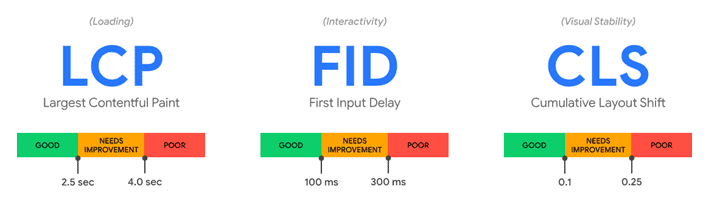
Google has developed the Core Web Vitals tool, which assesses your website on three parameters, all of which are crucial to the user experience. It collects data from users in Google Chrome over the past 28 days. This way, it analyses data that reflects the real experience your users have, as it uses data from different systems, screen sizes, and internet speeds.
It measures three things called LCP, FID and CLS. This can easily sound quite incomprehensible with two brand-new abbreviations besides CLS so we will go through them here, so you understand what your website’s score in Core Web Vitals is based on.
Largest Contentful Paint (LCP)
LCP tells you how long it takes before your website’s primary content is ready for the user. Your website will pass this test if the time is under 2.5 seconds.
First Input Delay (FID)
FID tells you how long it takes from when the user performs an action on your website (a click, a search, and the like) until the browser carries out the action the user requested. To pass this test with Google, it must happen within a maximum of 100 milliseconds.
Cumulative Layout Shift (CLS)
We have covered CLS above, and the more changes that occur on your website while it loads, the higher and therefore worse your CLS score will be.
Use Core Web Vitals when you want to put your website to the test
With Core Web Vitals, Google has set a threshold of 75%. This means your website passes the test if 75% of your users have a satisfactory experience in relation to the three parameters that form the basis of the Core Web Vitals assessment.

How do I find Core Web Vitals, and how can I use it to make my website better for users?
If you log in to Google Search Console, you will see on the homepage whether your website passes the Core Web Vitals test. In addition, they have developed a tool in there that allows you to check, for each individual URL, whether the Core Web Vitals test has been passed.
In addition, you will be able to see how the test result develops for individual pages. This way, you can easily and conveniently get an overview of which changes speed up your website and which changes, in the worst case, make your website slower and therefore less user-friendly.
I hope you now have a better understanding of how, with the help of Google’s Core Web Vitals, you can make the user experience on your website even better and thereby further improve your chances of securing more conversions.