





AI
27. November 2026 3 min
ChatGPT Business Hub: Have you claimed your profile yet?
With Business Hub, you can correct what ChatGPT says about your company and see how often you’re mentioned. Here’s how to do it and whether it’s worth the effort.
Indhold
What is Business Hub? Why does it matter? What do you get out of it? How to claim your profile What if you don't claim your profile?When someone asks ChatGPT about your company, it answers based on what it has found about you on its own. With Business Hub, you can now correct that information and see how often you’re mentioned. We’ve claimed Morningtrain’s profile, and here we walk you through how to do it and whether it’s worth the effort.
What is Business Hub?
Business Hub is OpenAI’s tool for businesses in ChatGPT. This is where you confirm that the business is yours, correct the information about you and track how often ChatGPT mentions you.
OpenAI launched it as a beta on 10 November 2026, and Danish businesses could take part from the start. Business Agent, which lets businesses answer customers directly in ChatGPT, is only available in the US for now.
Why does it matter?
Picture a buyer asking ChatGPT who can supply a specific solution for their production. ChatGPT answers based on what it can find about the possible suppliers. If the information about you is outdated or wrong, that’s what the buyer sees.
A claimed profile doesn’t change whether you’re mentioned. But it gives you a say in what’s written when you are.
What do you get out of it?
Control and insight. Don’t expect traffic or enquiries yet. Specifically, you can:
- correct your description, category, logo, photos, contact details and opening hours
- see how many times ChatGPT has mentioned you in the last 28 days, how many people have viewed your profile and how many have clicked through to your website
- see which topics you’re mentioned in connection with, once there are enough mentions
- add a product feed with prices and stock levels if you sell physical products.
How to claim your profile
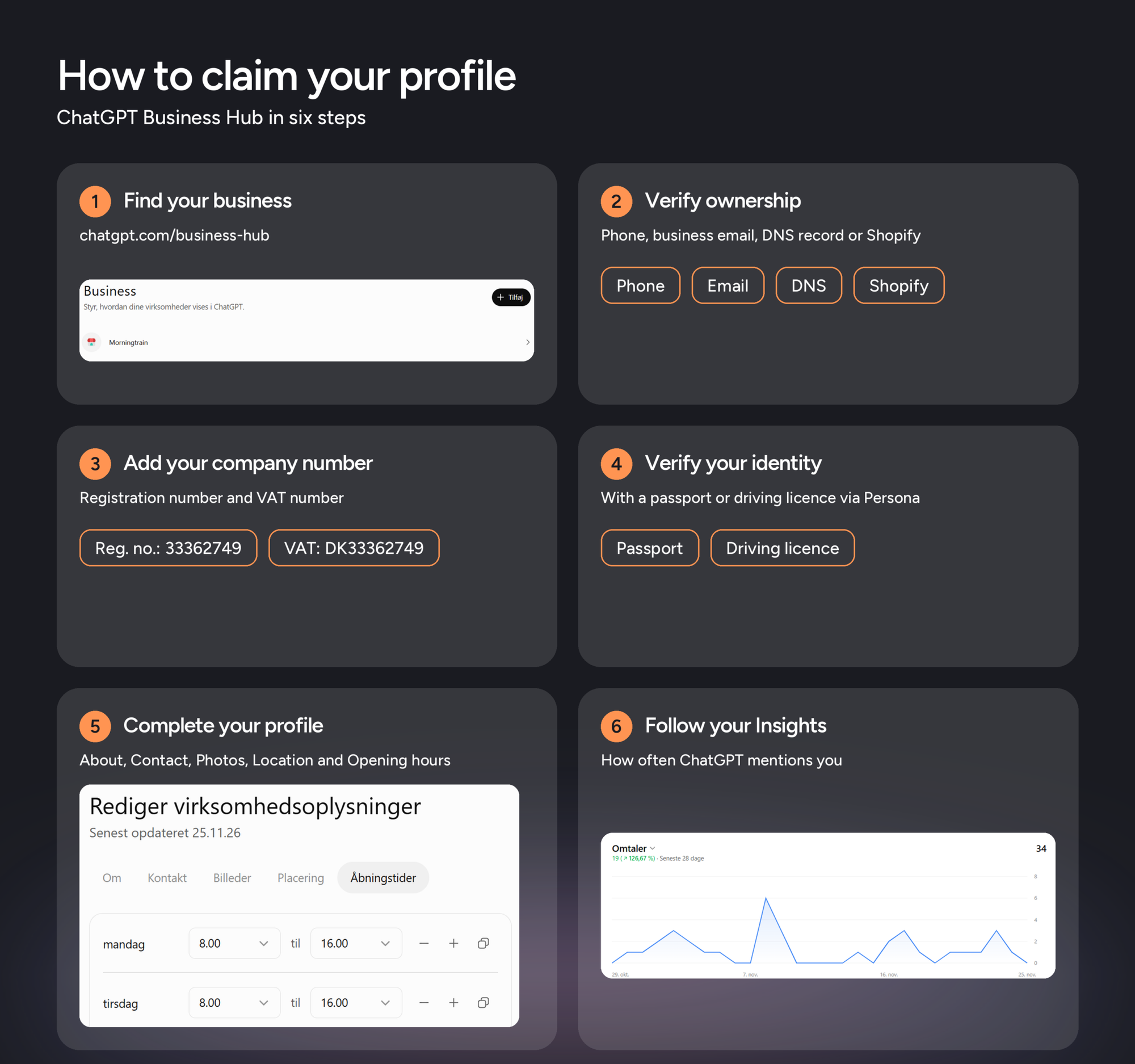
The setup itself doesn’t take long. It’s the approvals that take time. Here’s how:
- Go to chatgpt.com/business-hub and search for your business.
- Confirm that the business is yours. You can choose between phone, business email, a DNS record on your domain or Shopify.
- Enter your business type and company registration number.
- The person who will manage the profile verifies their identity with a passport or driving licence via Persona, which OpenAI uses for the check.
- Once you’re approved, you can fill in the About, Contact, Photos, Location and Opening hours tabs.
What if you don’t claim your profile?
It still exists. ChatGPT builds it from what it can find about you, and you can neither correct it nor see how often you’re mentioned. OpenAI hasn’t said how much weight the profile carries in its answers. That’s exactly why we’d rather be in control than guess.

Written by



Let’s talk about your digital buying journey
We’ll go through your profile and buying journey together and tell you honestly what makes sense to do first.