Data insights
5. September 2023
Meet GA4: Your new best data friend
GA4 (Google Analytics 4) has become an indispensable tool for many companies that want to actively leverage data about their website—whether to develop the business and make marketing decisions. We take a closer look at what GA4 tracking is, how it works, and why it should be a must-have.

What does Google Analytics 4 cover?
GA4 enables your company to track a wide range of data about your website. This includes, among other things:
- Searches in the search field: Which searches users perform in the search field on your website.
- Page views: How many times your page is viewed by different users.
- Scrolls: How far down the page the user scrolls.
- Channels: Which channels users come from (e.g., organic search, paid search, social media, etc.).
- Downloads: How many times users download files from your site.
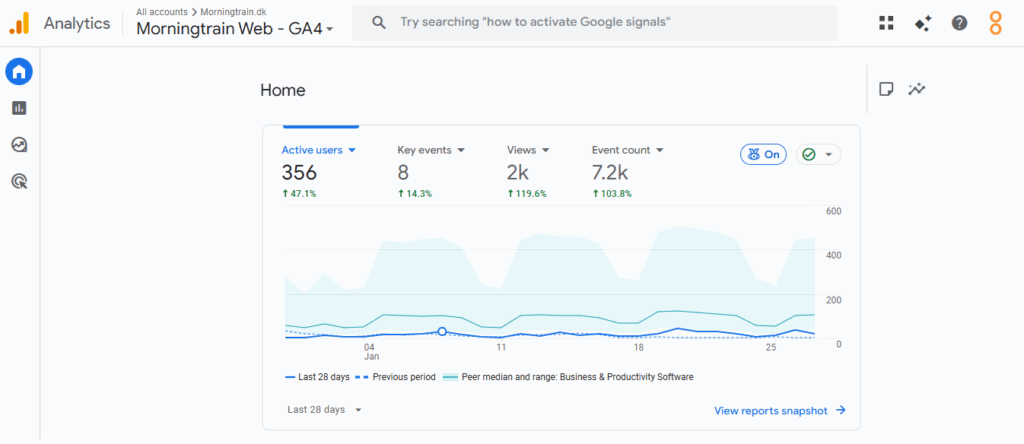
Upgrades in Google Analytics 4
Google is constantly updating and improving GA4 to ensure it is as relevant and useful as possible.
One of the most significant recent upgrades is the introduction of Google Consent Mode, which enables companies to collect and use data in a more ethical and lawful way.
Google Consent Mode
Google Consent Mode is a feature that enables companies to adjust how their Google tags use cookies based on users’ consent settings. This means that, as a company, you can ensure compliance with GDPR requirements while still collecting important data.
Data-driven attribution
Another important upgrade is GA4’s focus on data-driven attribution. This means that GA4 uses the data you have to give you a more accurate picture of how your customers interact with your website and your ads.
This can help you make more informed decisions about how to improve your website and your campaigns.
How do you set up GA4 tracking?
Setting up GA4 tracking can vary depending on your company’s specific needs and requirements. However, here is a general guide to help you get started:
- Create a GA4 account: First, you need to create an account in Google Analytics 4. You can do this by going to the Google Analytics website and following the instructions.
- Install GA4 tracking on your website: Once you have created an account, you need to install GA4 tracking on your website. You can do this by following the instructions on the Google Analytics website.
Note: If you use a CMS such as WordPress, you can install GA4 tracking using a plugin such as ‘GA Google Analytics’. If you do not use a CMS, you may need to insert the GA4 tracking code manually into your website’s HTML code.
Test your GA4 tracking: Finally, test that your GA4 tracking is working correctly. You can do this by going to the ‘Realtime’ section in your GA4 account and checking whether your website is generating data.
Configure GA4 tracking: Once you have installed GA4 tracking on your website, you need to configure it to suit your needs. You can do this by going to the ‘Admin’ section in your GA4 account and selecting ‘Data streams’. Here you can customize which data you want to track and how you want it presented.
What are the benefits of GA4 tracking?
GA4 tracking offers several advantages compared to other similar systems. Here are some of the most important:
Built-in reporting feature: GA4 has a built-in reporting feature that makes it easy for you to generate customized reports based on your data. This can be a major advantage if you need to present your data in a specific way to your colleagues or customers.
Data aggregation: GA4 enables you to collect and analyze data in a highly detailed way. This makes it easier for you to get an overview of how your users interact with your website and how you can improve your online presence.
Future-proof platform: With GA4, you get a platform designed to handle the challenges of the future. This is especially relevant when it comes to privacy and the use of cookies.
Who is GA4 tracking relevant for?
GA4 tracking is relevant for all companies that want to actively leverage data about their website. It can help you understand how your users interact with your website, which pages they visit most, which channels they come from, and much more.
This information can be invaluable when you need to make decisions about how to improve your website and your online marketing.
Is GA4 tracking GDPR-compliant?
Yes, GA4 tracking is GDPR-compliant, as long as it is used correctly. The EU and the US have agreed that Google Analytics is OK to use, provided you comply with certain rules.
For example, you must ensure that you only collect data when users have given their consent, and that you use Google Consent Mode to control how your Google tags use cookies.
What is a good GA4 tracking setup?
A good GA4 tracking setup depends on your specific needs and requirements. In general, a good setup should give you a clear overview of your website’s performance and help you make informed decisions about how to improve your online presence.
It can also be a good idea to integrate GA4 tracking with other tools such as Google Ads, Google Tag Manager, and Search Console to get the most out of your data.
Piwik Pro vs. GA4: Hvad bør du vælge?
Conclusion
GA4 tracking is a powerful tool that can help you understand how your users interact with your website and how you can improve your online presence. With its many features and upgrades, GA4 tracking is a must-have for any company that wants to get the most out of its online data.
However, always remember that the ultimate goal of GA4 tracking is not to collect as much data as possible, but to use that data to create a better experience for your users and improve your company’s results.