Lead generation
3. October 2018
What is Google Ads?
Google Ads is Google’s advertising tool, which makes marketing on Google’s products accessible to everyday marketers and agencies. This marketing channel has a wide reach and is effective at driving purchase-intent traffic to your site. Google Ads was previously known as Google AdWords and changed its name in July 2018.
Content
Brief description Name change What can it do Search ads Display Youtube Shopping Calculate investmentWhy change the name from Google AdWords?
There has been no official announcement as to why Google changed the name of its advertising tool, but I have a thesis:
For many people, Google AdWords is synonymous with the text ads in the search results. It is almost in the name, too: “Ad-Words”. Roughly translated as: Text ad.
But as the years have passed, Google has gained access to or acquired various platforms that can do much more than “just” support text ads.
So my guess is that they changed the name from Google AdWords to Google Ads because they needed a name that captured what you get access to in the tool.
So what do you get access to in Google Ads?
Google Ads gives you access to create ads:
- In Google’s search results
- As display banners across the internet
- As video ads on YouTube
- In the Google Shopping tab
And the best thing about Google Ads is remarketing. Here, you can choose to increase the frequency of your ads to people who have already interacted with your business by visiting your website. They have shown interest, so it will take less for them to convert.
Yes, that may have sounded like gibberish, but bear with me it will all make sense.
Search ads
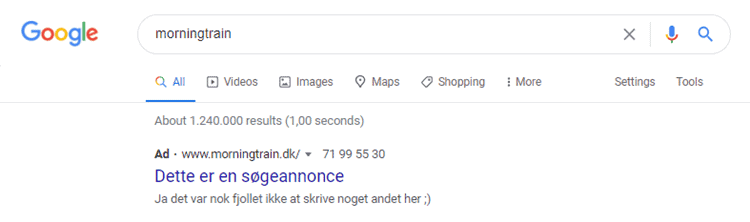
The search ads in Google’s search results are probably the most talked-about and best-known advertising method in Google Ads. These are the ads that appear directly in the search results.
These ads are triggered when the selected keywords are searched for on Google.
But even though you pay for the placements you select in Google, Google still looks at relevance. The more relevant your ad is to the keyword, the cheaper your clicks will be.
Conversely, irrelevant ads pay more for their clicks. Typically, the price varies by 30–70% depending on the ad’s relevance.
Benefits of search ads
- You only pay when someone clicks your ad.
- You choose the keywords yourself.
- You can choose which geographic areas you want to appear in.
- You get a top spot on Google with the snap of a finger!
Drawbacks of search ads
- Yes, you pay per click. It is an auction so the more people are willing to pay for your keyword, the more expensive it becomes for you. In extreme cases, the price can reach DKK 180 per click, so make sure you are not buying irrelevant traffic.
- To master Google’s search ads requires a combination of technical savvy, copywriting skills, and a statistical mindset. In other words: setting up search ads and entering your credit card details is not, in itself, a profitable solution.
Display banners
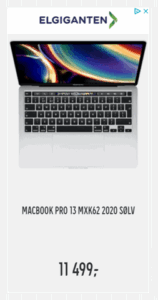
Display banners are graphic ads that appear in the ad placements Google has purchased across millions of websites.
Almost everywhere you see banners, they come from Google Ads. You can recognise them by the small blue icon in one of the corners.
Display banners come in many sizes. You can see the list here.
The ad creative in a display banner is a static image (a graphic), a GIF, or a short animation.
In display advertising, you target either by creating an audience based on their behaviour on your website (via Google Analytics), by selecting a predefined audience, or by choosing which pages you specifically want to appear on.
Benefits of display ads
- You pay per 1,000 impressions, and it is usually so low that it is measured in øre.
- You get an enormous reach because you can reach people across websites.
- You can choose which geographic areas you want to appear in.
- It is possible to appear on your target audience’s favourite websites.
Drawbacks of display ads
- Display ads primarily have branding value, so it is difficult to gauge performance, as very few people actually click on banners.
- At times, you will get a lot of bot traffic via display ads.
- It is a prerequisite that you can produce graphic content. Without it, you unfortunately will not get anywhere.
YouTube ads
Yes, that is correct!
Google Ads gives you access to ads on YouTube.
You probably know those ads that play right before a video. Some can be skipped others cannot. It depends on the length of the ad and whether it can be set up as “unskippable”.
YouTube also allows ads in its search results. YouTube is, by nature, a search engine just like Google only for video content. This means you can place ads in the search results, and just like with search ads, the key word is relevance. In other words, you cannot just throw an ad for bicycles into a search about website development.

Benefits of YouTube ads
- There are hardly any cheaper views for video ads.
- Setup is easy: you simply insert the link to your video and fill in two fields, and you are good to go.
- You can choose which geographic areas you want to appear in.
- You can target very specific audiences (everything from what they search for to their interests).
Drawbacks of YouTube ads
- If you do not know how to exclude audiences, children will account for 50% of your views.
- It requires high-quality video content to be effective at all.
- It is first and foremost a branding tool, so it is difficult to gauge performance, as very few people actually click on the videos.
Google Shopping Ads
Do you run an online shop?
Then I hope you have come across ads in Google Shopping. If not, now is the time to pay attention.
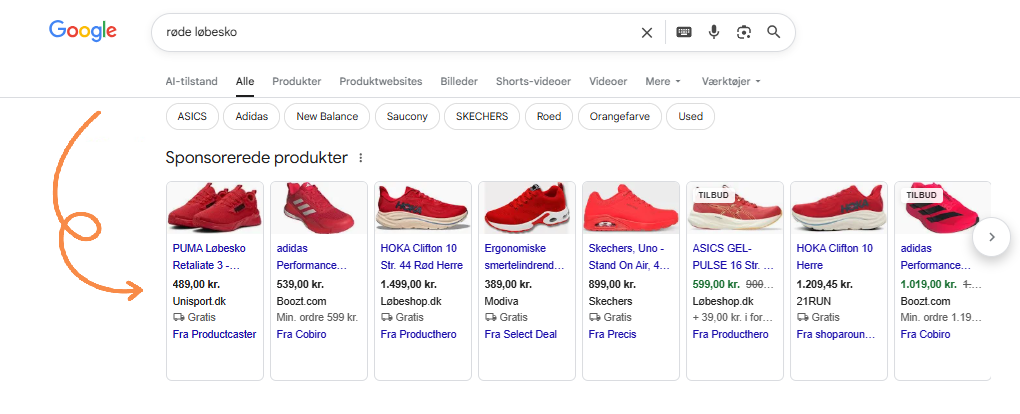
Shopping ads also appear in Google’s search results, but ABOVE the search ads and the organic results. In other words, they are the first ads the searcher is exposed to.
Just like with search ads, the ads are triggered by keywords but not by keywords you “choose” yourself. The keywords in Google Shopping ads are the words in the product names.
Google Shopping ads show the user a product image, a price, and the brand before they click.
This may be the factor that makes Google Shopping advertising most interesting. By presenting the user with almost all the information before they click, you are less likely to get irrelevant traffic. Did I mention that here, too, you only pay per click? 😉
Benefits of ads in Google Shopping
- You only pay per click.
- Traffic from this type of ad has some of the highest conversion rates.
- You can get low cost-per-click compared to search ads.
Drawbacks of ads in Google Shopping
- Because you provide so much information to users upfront, fewer people click on the ads. Therefore, click-through rates are more often lower in Google Shopping than in search ads.
- It requires a bit more technical savvy to optimise ads in Google Shopping.
- It is 100% Google that decides whether product ads are shown.
Google AdWords = Google Ads = Google Advertising
Now there can probably no longer be any doubt about what needs to happen from here:
You need to go and play with Google’s advertising tools, and I will not take up any more of your time.
I hope you now have a clear understanding of what Google Ads gives you access to.
What should you invest in Google Ads?
I would define what you should invest in Google Ads based on your desired output. Below you can insert some variables and the calculator will tell you what you should be willing to invest, based on some rules of thumb and calculations.
Note: The calculator is based solely on B2B companies and on search ads.