Digitalization
12. November 2025
Process automation
Process automation digitises workflows, reduces manual errors, and hands routine tasks over to technology so people can focus on what matters. Read step by step and see which tasks are best suited.
Content
What is a RPA? Which processes are suitable? What’s in it for me? Disadvantages of automation Automation step for stepDigitalisation through process automation in companies typically refers to the use of technology, such as software and workflow automation, to automate repetitive manual tasks and thereby improve efficiency and productivity across the organisation.
At Morningtrain, when we talk about automation, it is always based on the company’s business needs, where the goal of automation is to create value for the business.
Process automation can be rules-based or AI-assisted. Use rules for stable, repeated steps; use AI when input varies. We most often use rules for stable steps and supplement with AI when input varies.
What is RPA?
Automating a manual process is called “RPA” (Robotic Process Automation). It is software programmed to mimic the clicks and keystrokes a person would make in a system think of it as a digital colleague.
Which processes are frequently automated?
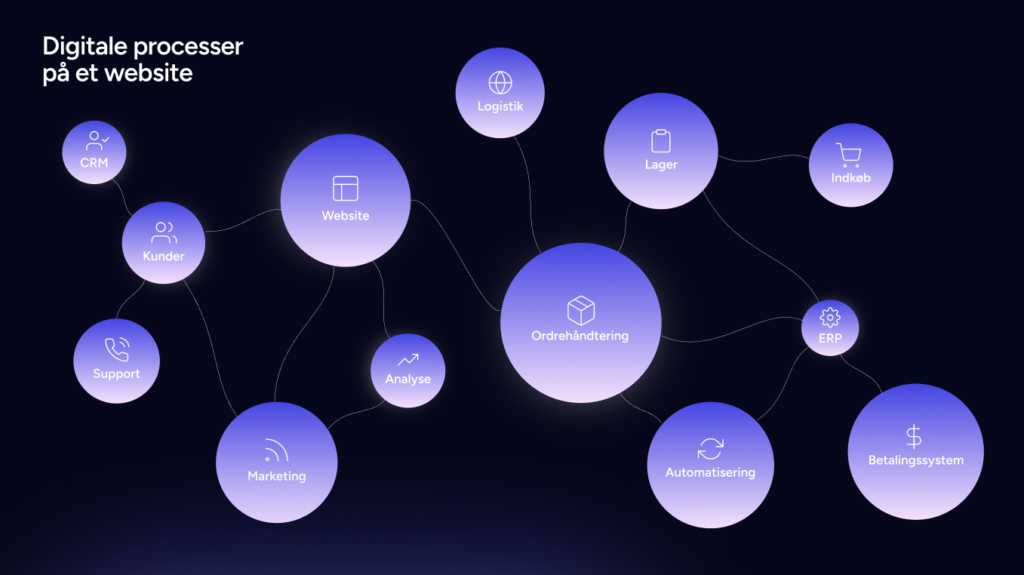
The processes most frequently automated using software and workflow automation are repetitive or manual processes where, in practice, there is no need for human interaction. Some of the processes we typically automate are:
- Entering, editing, or moving data
- Collecting data from different data sources
- Inventory management
- Bookkeeping in financial systems
- Preparing budgets, production plans, and forecasts
- Customer service with a focus on reducing lead time
- Automatic ordering of products for stock
- Automatic handling of leads, e.g. registration in CRM systems
- Preparing documents for orders, quotes, or PDFs that need to be signed.
Overall, many different recurring and standardised processes can be automated. This applies to both simple and complex processes. Most importantly, however, as a business you should always weigh the value automation provides against the effort required to automate the process.
What is the output of automating processes?
When we look at the output of automating processes, I would like to split it between two stakeholders. One is the employee, and the other is the company.
Starting with the employee, we see that automating manual processes does the following:
- Creates greater job satisfaction, as the employee is not buried in trivial tasks
- Fewer errors by the employee, as the employee is now assisted by software
- The employee creates more value for the company, as there is meaning in the tasks they work on now that the standardised tasks are handled by software
- More time in everyday work for what matters, with greater accuracy
From the company’s perspective, we typically see the following:
- Increased productivity
- Strategic decisions can be made faster
- Reduced error rate
- Cost savings and freeing up time in day-to-day operations
Disadvantages of automation?
Some of the disadvantages of automating processes are as follows:
- The costs of implementing and maintaining the software. Remember to calculate your ROI (Return on Investment) so you have an idea of when your investment will pay for itself
- Need for reskilling employees and adjusting roles and responsibilities, as tasks move from manual data entry to monitoring, error handling, and continuous improvements
- Potential job losses, as in some cases it can eliminate jobs entirely
How do you automate a process?
If you want to implement digitalisation and automation of a process in collaboration with a consultancy, you can follow these steps:
1 – What should be automated?
Identify potential processes you want to automate. It can be useful to involve employees who are directly involved in the process to ensure you identify all relevant tasks and steps in the process.
2 – Research the market
Contact companies that have experience automating similar processes. It can be useful to review their references to get a sense of their previous experience and results with process automation.
3 – Plan for implementation and training
Evaluate the possible automations and develop an implementation plan together with your chosen company. Make sure the company helping you can help identify the best software solutions for your business, implement them, and train your employees to use them afterwards.
4 – Implementation and testing
Carry out the implementation and test it in a safe environment that allows for errors. It can be useful to have a project manager from your own company working closely with those responsible for the implementation to ensure everything proceeds as planned.
5 – Analysis of the results
Make sure to measure and monitor the effect of the automation after implementation, and adjust the process or software if necessary to improve results. Also ensure that your chosen partner can help monitor and analyse the results and advise on how you can improve them.
Last but not least, see if you can start with an MVP (Minimum Viable Product), as you will learn as a business as soon as you begin rolling out the automation across the organisation.
Read the 6 considerations that increase your chances of success with digitalisation here

Written by






Do not hesitate—we are always ready for a conversation
Should we also help with your processes?
Let’s go into detail so we can find solutions together that match your needs.