Data insights
17. February 2025
UTM builder: A simple and free tracking tool
This tool gives you quick, easy, and free access to add extra parameters to your links, so you can enrich your GA4 (or other tracking source) with more information.
Content
This is how you do it Descriptions and examples What is UTM codes Who is UTM codes for Rule of thumbGenerer din egen UTM URL
Fill in the fields above and copy the link
Insert the URL the generator creates for you wherever you place a link in your campaigns. This could, for example, be your Google Ads campaigns or to track your email marketing.
Please note that only the following fields are required:
- Website URL
- Source (utm_source)
- Medium (utm_medium)
See how to fill in the UTM builder
In the example below, we have set up a UTM code for a Paid Social campaign on Instagram.
Description and examples
| Parameter | Required | Example | Description |
| Domain Website URL | Yes | Morningtrain.dk | The destination on the website that the user should ultimately be sent to. |
| Campaign Source utm_source | Yes | “Google” | Use “utm_source” to identify which overall channel the traffic comes from (e.g., email, Google, or LinkedIn). |
| Campaign medium utm_medium | Yes | “PPC” | Use utm_medium to know which part of the channel the traffic comes from (e.g., a specific initiative). |
| Campaign name utm_campaign | No | “Lead sprint” | You should use utm_campaign if you want to know which specific campaign the traffic comes from. |
| Keyword utm_term | No | “product configurator” | utm_term is only relevant for Google and Microsoft Ads, where you can see which keyword the traffic came from. |
| Content utm_content | No | Logo link | Use this if you are split-testing landing pages and need to easily compare the performance of the two pages. |
What are UTM codes?
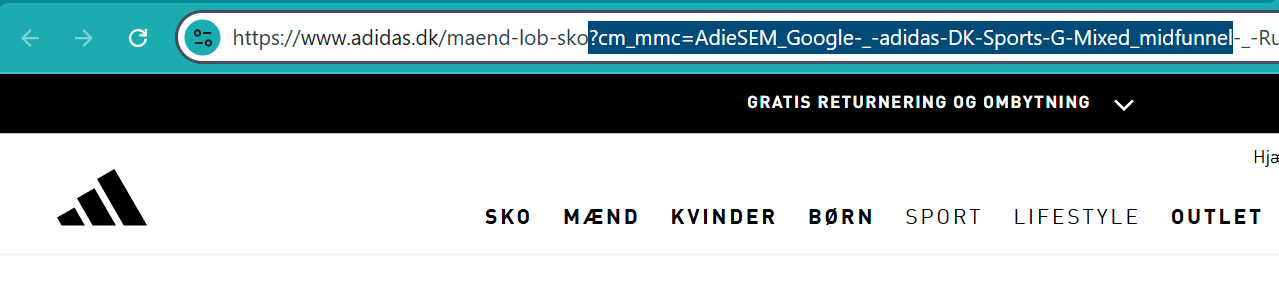
A UTM code is a string of parameters that is placed after a ‘?’ in the original URL. UTM codes make it possible for you to send more information about your traffic to tracking sources such as GA4 or Piwik Pro.

You have probably seen a UTM code before if you have clicked on an ad on either Google or Meta:
Who should use UTM codes?
Anyone with more than 2,000 monthly visitors on their website should use UTM codes. And that is just a rule of thumb I have pulled out of thin air. The point is that you need a fair amount of traffic before it makes sense to do additional work with parameters.
If you use UTM codes with a small amount of traffic, you simply risk analysing datasets that are too small to make decisions based on anyway.
UTM codes are not indexed by Google
A nice little detail is that UTM codes are not indexed by Google. This means you do not risk your UTM codes suddenly ranking in search engines and competing with your original URLs.
So you should not hold back on split-testing either. That is practically the whole idea behind UTM codes.
Good rules of thumb when creating UTM codes
1. Users can see what you write in your UTM codes, so do not write things they must not see
2. The naming of UTM code parameters must make sense to you/your team
The terms you use must make sense to you. This is for internal use, so make sure the terms resonate internally. For example, if you say “Google Ads” and not “cpc”, consider using a source/medium called “google/ads” rather than “google/cpc” (see the example below).
3. Remember to be consistent with your structure
4. UTM codes distinguish between uppercase and lowercase letters, etc.