Lead generation
23. January 2022
What is Google My Business?
Google My Business is a business listing that Google uses to showcase businesses with a physical location, along with general business information.
Content
What is the idea behind it? Who should use it Get started Optimize your profile Step by step guide to creation Our adviceWhat is the idea behind it?
The idea is a kind of lightweight version of proff.dk just with information that is relevant to the average user, such as:
- Company name
- Photos from and inside the business
- Customer reviews
- Social media linked to the business
- The company’s physical location
- Company phone number
- Company website
- Opening hours, etc.
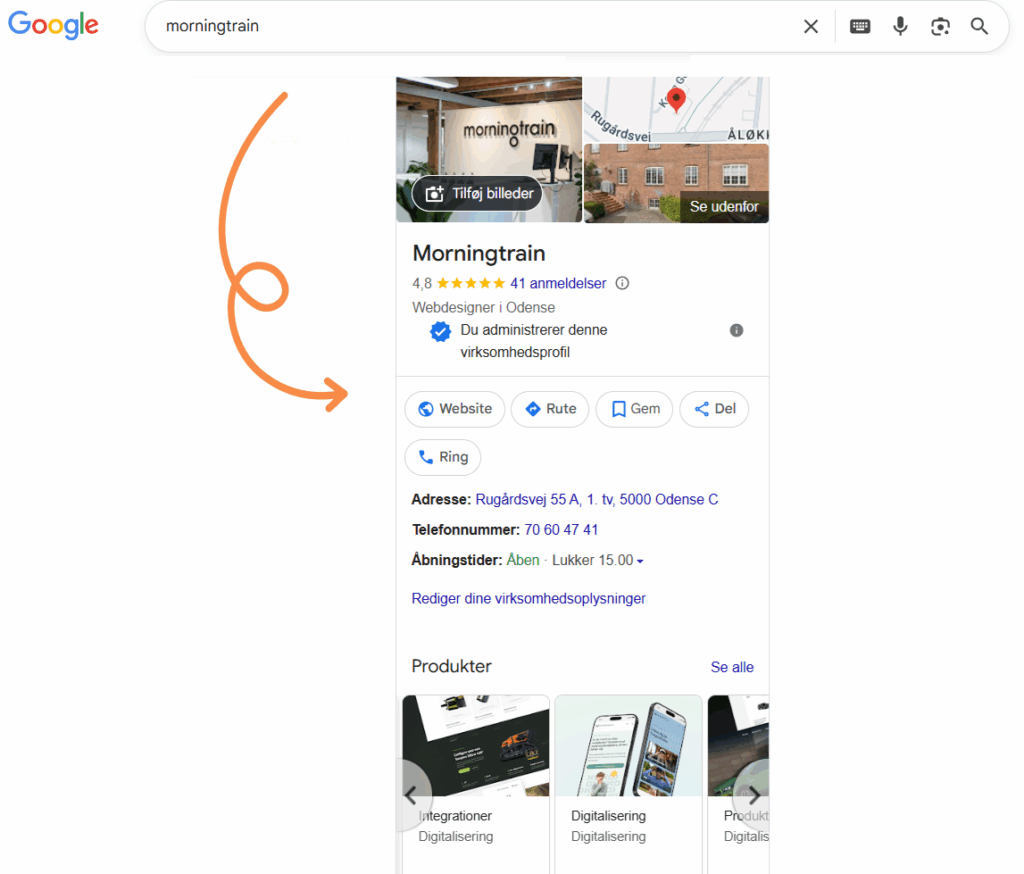
Have you ever done a Google search and wondered about the large box with company information that takes up the entire right-hand side of Google’s results? If so, you have probably come across Google My Business.
An example from Morningtrain is this 👇 (pssst… the blog continues below the very long image😁)
Who should have Google My Business?
All businesses should have Google My Business.
Google My Business is the first thing your potential customers see when they search for your brand name. So it is part of your brand experience.
In addition, it is a quick and easy way to provide important information to your potential customers for example, when you are open, where you are physically located, and your phone number.
In most cases, Google My Business is created automatically. Google also tries to add a bit of content but I have yet to see Google succeed in creating a really great Google My Business profile.
If you do not enrich your Google My Business, it can give the impression that the business is a bit dusty. Enhancing your Google My Business account can also help you get found for keywords beyond your brand within your local area.
If you, reading along here, run a trades business or similar, and you are not already on the edge of your seat then get out there now!
Get your business on Google Maps
Now it gets exciting!
Google My Business appears on brand searches (i.e., when someone searches for a specific brand name on Google) and potentially when people search for a local service.
The Google My Business information is the same information Google uses in Google Maps. Put another way: When you perform a Google search and choose a result from Maps, you see the same information as in Google My Business.
This means you have the opportunity to have your Google My Business shown in local searches.
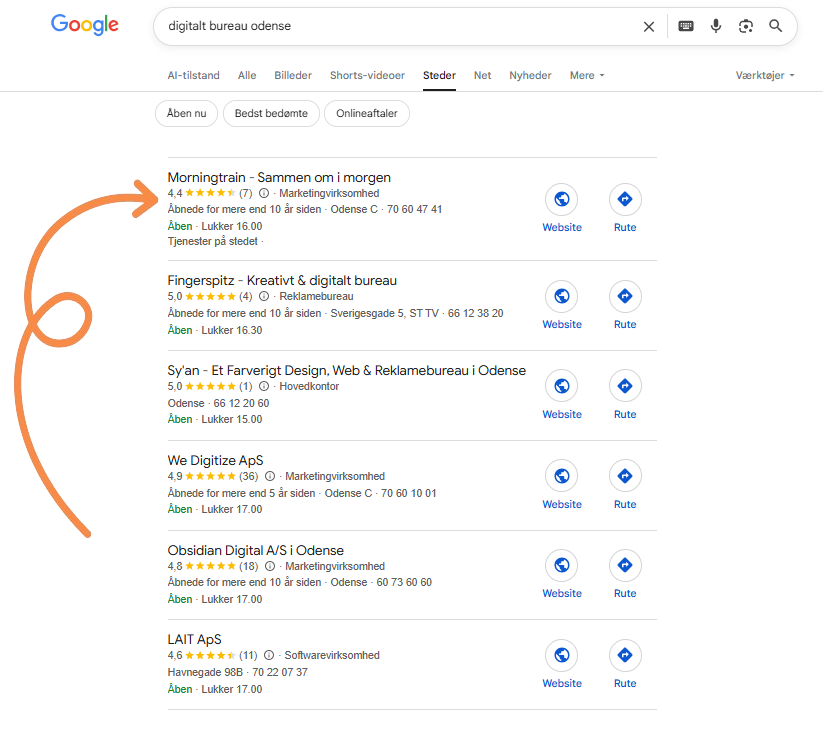
In other words, it is a way to make it very clear to your potential customers where you are physically located.
This is particularly relevant if:
- Your company’s physical presence is important to the customer (e.g., a physical store, a tradesperson, or an office for people who want suppliers close by).
- Your business has multiple locations.
And now it gets even better
You can connect your Google My Business with your Google Ads account and gain the ability to do two things:
- You can show your physical location directly in your search ad so your address also appears in Google’s regular search results.
- You can create ads in Google Maps through Google Ads (see the example below highlighted in green).
In other words, you can advertise based on your physical location with an ad that quickly shows users your great reviews and takes them to your website.
And as if that were not enough:
With one click, users can send your Google My Business information to their own phone. This is smart if people are searching for your store right before they head out the door then they can send the directions to themselves so they can find their way to you.
That is simply good customer service. 😊
How do I get a Google My Business?
Creating a Google My Business is probably the easiest marketing activity you will deal with today.
- First, go to https://www.google.com/business/
- Then make sure you log in to the Google profile you want associated with your business
- Then click “Add location” and then “Add single location”
- Then start by searching for your business. Most businesses have already been created by Google, so this is about “claiming” the business.
- If Google can find your business, simply follow the five steps to claim it. That said, you do not have to be the owner of the business to set up a Google My Business.
- If Google cannot find your business, simply choose “Add your business to Google”.
- Then follow the instructions. The steps are so easy that we do not need to cover them in this post. I am so sure it will be a piece of cake for you, dear reader so IF you cannot solve it yourself… then I owe you a beer! 😊
How to optimise your Google My Business
At a minimum, you should make sure you have the following in place:
- Logo
- 2–3 photos from inside the business
- 1 photo of the storefront
- Correct opening hours
- Correct phone number
- Website information
If you have a bit more time, you should prioritise working on your photos.
The order you upload them in is the order they are shown on Google so play around with creating good variety, and present them in the order that makes your business most appealing.
You can also post updates. Google loves freshness, and so do your visitors. And by posting updates in your Google My Business, both Google and searchers can see that there is activity in your business.
Well, that ended up being a longer piece about Google My Business.
Honestly, Google My Business is a really great FREE marketing tool with lots of potential especially for businesses with a physical presence.
But like everything else, it is not a cure for a serious illness. It is more of an addition to the long list of marketing tools you are already juggling. And Google My Business does not require ongoing optimisation to the same extent as other channels. So set it up and make it look great then you can move on to your other marketing efforts.
Enjoy.