Digitalization
22. September 2021
Why use horizontal scrolling?
As the headline suggests, I will take you on a short journey into the horizontal scrolling technique and all its features.
Content
Introduction Why this is important What is it Pros and cons How does it look UX Why should you careYou should use horizontal scrolling on your website for the following reasons:
- It can provide a better user experience
- It can give users something to interact with on the website
- You can present more content to users without making the page longer
- It gives the website a dynamic “feel”
Afterwards, you will (hopefully) feel a bit wiser about why it can be incredibly smart, but also what you should pay particular attention to if you choose to use this technique on one of your platforms.
Why should horizontal scrolling catch your attention?
Horizontal scrolling is important to the overall user experience and is especially seen on mobile devices, where it enhances the experience.
What is horizontal scrolling?
In short, it is when you scroll from one side of the screen to the other in a horizontal line. This is the exact opposite of vertical scrolling, which is what we normally see on digital platforms, where you scroll from top to bottom.
Typically, horizontal scrolling is used when there are elements that simply take up too much space for it to make sense to stack them underneath each other.
The horizontal method is therefore really effective when there is a lot of repetitive information, and to make the overall user experience smoother.
There are therefore many positive aspects, but that said, there are also things you should be aware of.
“What are those things?” you are probably thinking.
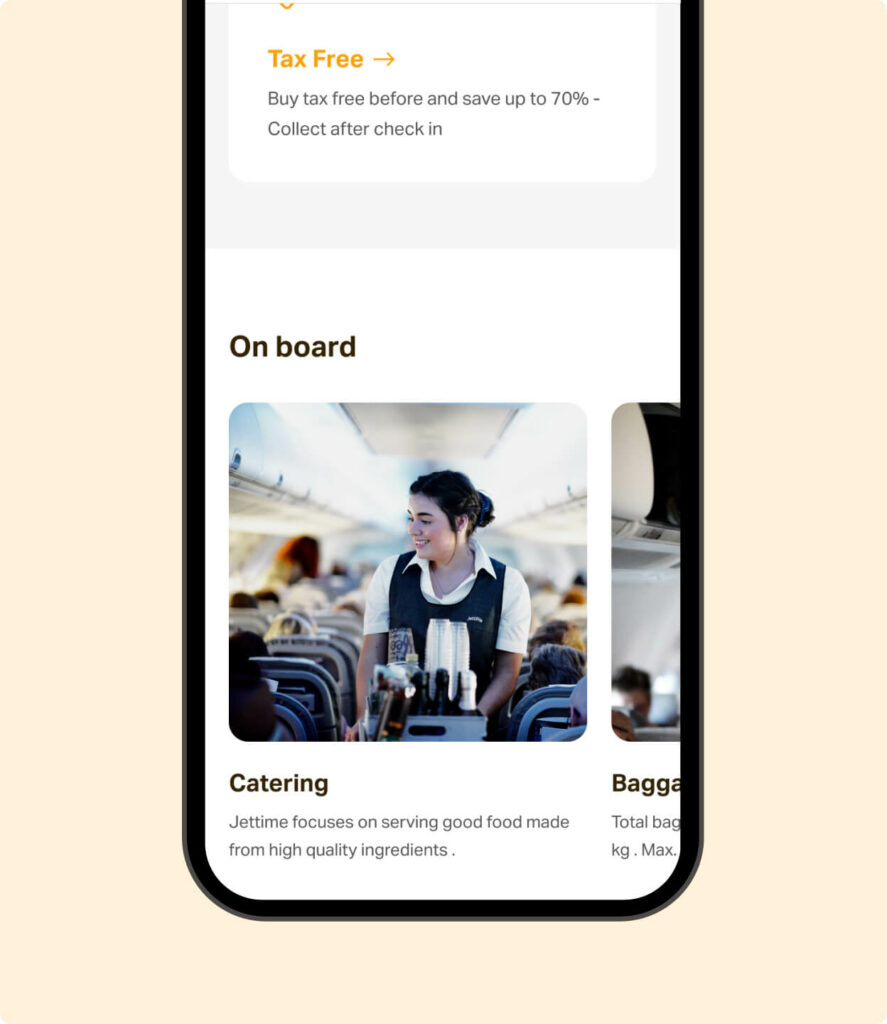
I will give you an example of that right now:
Advantages and disadvantages
As I briefly mentioned above, the biggest benefit of using horizontal scrolling is that there is space for much more information, while it can also improve the user experience considerably.
Similarly, data shows that the further down a page visitors get, the more visitors also drop off. This trend is due to the fact that all the information quickly feels far too overwhelming.
Therefore, horizontal scrolling makes it possible to show more content in a clear way to those who are interested, without losing focus.
You are probably sitting there thinking that it all sounds great and it absolutely is! But there are also some pitfalls that many people fall into with horizontal scrolling, and therefore something you should be aware of.
Many people forget to make it clear enough to users that there is actually horizontal scrolling.
This is important because it is not always intuitive to see that you should scroll sideways instead of down. This is the biggest pitfall you need to be aware of to achieve the best results.
“The biggest mistake you can make when working on the web is believing you should build functionality where people expect it to work in a completely different way than the way you have built it. You have to keep your target audience in mind” – Jesper Martinussen, Head of Digital Design
How to make horizontal scrolling clear
Precisely because there is a risk that users simply do not notice the horizontal scrolling, here are some tricks for how you can make it clear that there is more content they can scroll to.
What many typically do is add some arrows that users can click, which clearly show that there are elements users can see by scrolling horizontally.
Here at Morningtrain, we try to create the same feeling for users as they have in an app, where they can drag sideways with the mouse, just as they do on their mobile with a finger.
Usability: desktop vs. mobile
One of the most important things when talking about content on digital media is the user experience. On a mobile, users are used to scrolling in apps, so they are accustomed to an experience that is slightly different than when they are on a website with a mouse available.
Therefore, horizontal scrolling is easier for people on mobile to understand, because users are already used to tapping a screen and making something move, and this has become quite intuitive for all of us. The more web-like feelings you can combine with mobile, the better you also make the mobile experience.
Therefore, horizontal scrolling works clearly better on mobile than on a computer, unless you put significant effort into making it clear to users on desktop that there is horizontal scrolling.
Why is it important for you to know about horizontal scrolling?
The main reason it is particularly relevant today is that many companies are competing for customers’ attention, and you have little time to tell them what you want to tell them. That is why screen size and scrolling are important elements to consider.
You have very little time to impress visitors and tell them what you want them to do, so it is your way of showing something someone might be interested in. At the same time, you can also ensure that those who are not interested can quickly move on.
To wrap up…
We have covered a lot, so it makes good sense to end with a summary.
The key points you should take away are:
- No matter what, you should not use horizontal scrolling if the content is important.
- You should therefore only use it in places where some information is less relevant and can therefore be omitted.
- This is due to the likelihood that some people will miss information, no matter how user-friendly you make it.
- So, for example, if you have listed your core competencies, you should not hide them in a horizontal scroll.
- A modern website today should ideally be readable in the sense that you scroll down through it, and then you can understand from the headings which products are being sold.