Digitalization
24. November 2021
10 challenges you often encounter with language versioning – and how to solve them
Below, we have elaborated on 10 challenges we repeatedly see on multilingual sites/shops, along with concrete suggestions on how to address them.
Content
The 10 challenges 1. Bad tools 2. Wrong redirects 3. Choice of domain 4. Currency 5. VAT calculation 6. Freight 7. Payment gateway 8. Reporting 9. Bad URLs 10. Not everything is translatedThe 10 challenges
- Unintelligent translation tools
- Redirection gone wrong
- Local vs. generic domains
- Incorrectly configured exchange rates
- Errors in VAT settlement
- Shipping solutions do not include local providers
- Payment solutions do not include local providers
- Sales reporting is done in the native language
- URLs that do not make sense
- Only a few pages are translated
A multilingual website or webshop can pave the way for new customers and international market share.
However, if your website or webshop is not set up to handle the technical and user-experience aspects of language versioning, your platform will not only undermine your conversion and SEO efforts, but it will also make administration more cumbersome than necessary.
No. 1: Unintelligent translation tools
The easy way to get translated texts is through translation tools that, with just a few clicks, can translate your Danish content into many other languages. And that is very convenient, because it saves you time and money on finding a translator, right?
The problem is that the quality is often extremely poor when you use that kind of tool. And if there is one thing you should never compromise on, it is content quality.
We all know it. If we have the option to view a site in our native language, we do. If we see that the text is complete gibberish, we immediately lose trust in the site.
But unintelligent translation tools do not only give your visitors a poor user experience. They also work against your SEO efforts, because you simply do not get the keywords included.
Optimization should always be adapted to the local market. You therefore will not win any international rankings by inserting your Danish focus keywords into your content and then translating the whole thing into English, German, French, etc.
Solution: Whenever possible, always use a native speaker for your translations, as this ensures high quality. And if you insist on using a translation tool, make sure it allows you to manually edit the individual languages.
Bonus tip
If you are targeting different countries, it can be a very good idea to have different local offices represent you. People tend to prefer speaking with their fellow countrymen.
If you have local offices, you should also always mark them up with structured data, as this tells Google that you have local representatives. And Google tends to assign greater value to local offices.
Read more about structured data here.
No. 2: Redirecton gone wrong
Many swear by WPML when they want multiple languages on their site. WPML is a plugin used to manage many translations. However, there are two things you need to remember when using WPML.
Be aware of the default setting
The default setting in WPML automatically redirects visitors to a language version that matches the country they are in. If you are in the US and want to view the German page, you will therefore, by default, be redirected to the English page—unless the site administrator has changed the default setting. And that is a problem, for example, if you are German and located in the US. As a German, you would want to read in German, but the default setting in WPML does not allow it.
Redirection does not only create problems for people but also for machines. If Google’s robots only have access to one version of your site, they will never find any of your other language versions. This causes you to lose rankings.
Solution: Make it possible for visitors to redirect themselves. In WPML, there is a feature that notifies your users that their language and country do not match. They will then be offered the option to be redirected.
Always choose plugins that are compatible with each other
If you use many plugins that do not work well together, it can affect the server’s memory (RAM) and, in a worst-case scenario, crash it. Too many plugins can also create speed issues, which affects your SEO as well as the user experience on your site.
Solution: Pay attention to which plugins you install. As a rule of thumb, choose plugins that are sensibly coded and work well together.
No. 3: Local vs. generic domains
When you create language versions, you should be aware that there are pros and cons to local domains (.dk, .se, .no, etc.) as well as generic domains (.com, .io, .net, etc.).
The advantage of local domains also called ccTLDs is that many people trust them. In addition, we have previously seen Google assign higher rankings to local domains in local search results. The downside is that you have to build an entirely new site and an entirely new link profile if you choose to get a new (local) domain.
Solution: There is no black-and-white answer here, but we recommend considering whether it is worth the hassle to invest in local domains. Does 95% of your revenue come from Denmark, while the remaining 5% comes from 11 different countries? Then the answer is a resounding no. Do you generate DKK 5 million in annual revenue in the German market? Then a German domain immediately makes more sense.
No. 4: Incorrectly configured exchange rates
If you have a webshop, you most likely use a plugin to manage exchange rates. Here, it is important that exchange rates are always up to date; otherwise, you risk your customers paying more than necessary for their goods. And when they discover it, you can safely assume they will not set foot in your shop again. And neither will their friends, or their friends’ friends.
Solution: Set the rates manually, or choose a plugin that automatically updates exchange rates so they are always current. The latter solution is preferable, as the former is extremely time-consuming. At the same time, you should choose a plugin that automatically rounds prices up or down, depending on the local standard for price display.
For example, if you have a product that costs DKK 79 in Denmark, it will not do for the price to be €10.59 on your German site (our German colleague confirms this :-D). Here, your plugin should automatically either round the price down to €10.50 or up to €10.99.
No. 5: Errors in VAT settlement
VAT differs from country to country and can also vary from product category to product category. A single error in the VAT accounts has never killed anyone, but persistent VAT errors end up consuming administrative time and time, as we know, equals money.
Solution: You must be able to manually enter VAT in your system for your different countries.
No. 6: Shipping solutions do not include local providers
When you want to target international markets, make sure to offer shipping solutions that are popular with the different nationalities. Danes, for example, use PostNord and GLS, while Germans use Deutsche Post, GLS, and Hermes. It creates reassurance to know that you can have your order delivered with your preferred carrier.
Solution: Monitor your checkout flow via a funnel in Google Analytics. Here you can see how many drop off when they have to choose a shipping option/price. Use the data from here and compare it with data from your other countries. If you can see that the drop-off is higher in one country, it may indicate that your users are not satisfied with the selection of shipping providers.
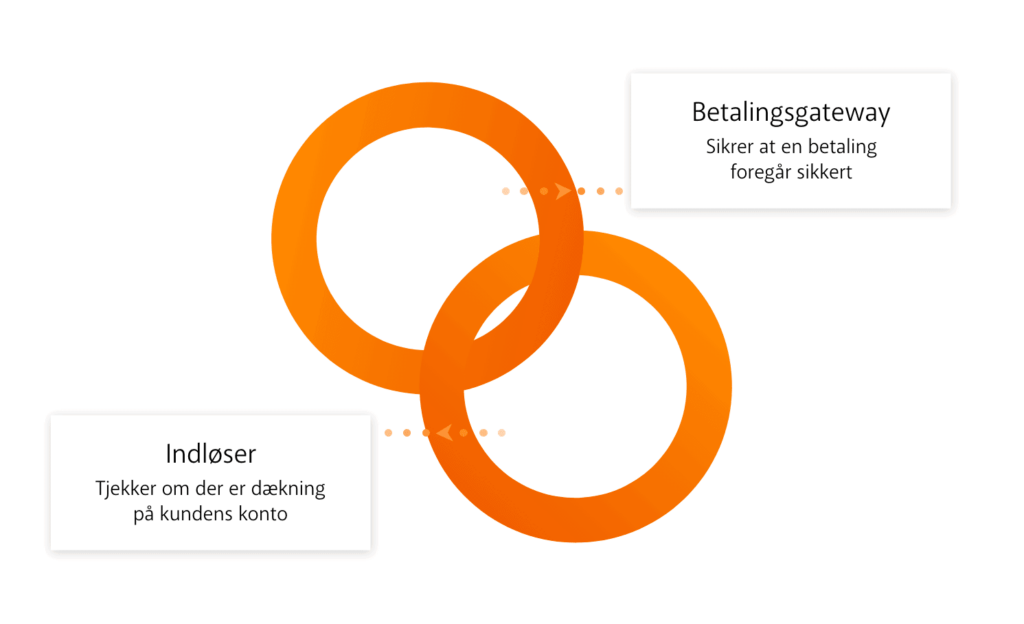
No. 7: Payment solutions do not include local providers
The challenge with payment solutions is exactly the same as with shipping solutions, as you also need to find the solutions that are used locally. In Denmark, for example, we are very fond of using MobilePay, and therefore more and more webshops now also offer payment with MobilePay. In Sweden, they are crazy about Swish, which is the Swedish equivalent of MobilePay.
Solution: Stay up to date on which payment solutions are popular in the different countries. If they have a large user base, explore the possibility of supporting them in your shop as well.
No. 8: Sales reporting is done in the native language
Sales reporting in the accounting system is often done in one’s own native language. This means that even if you have Danish, Swedish, and Norwegian orders, they are shown in Danish kroner in your accounting system. And that is understandable enough, because we want to make it as easy as possible for ourselves. But it can create confusion if you want to maintain an overview of the different orders and where they come from.
Solution: Use the local currency. However, there is a balancing act: if you handle a maximum of three different currencies on your own, it does not affect your overview that reporting is done in Danish kroner. But if you work with many more currencies, you most likely have an employee to handle reporting for you. And here it can become difficult if they have to handle everything in Danish kroner.
No. 9: URLs that do not make sense
Always keep an eye on your URLs. CMSs such as WordPress tend to create messy URLs, as they are typically auto-generated from your H1 titles. This is especially true if, as a Dane, you have æ, ø, or å in your title, or if, as a Spaniard, you use ¿.
Messy URLs create confusion not only for you and your visitors but also for Google, which uses them to assess rankings.
Solution: Create your URLs manually.
No. 10: Only a few pages are translated
It is always a frustrating experience when you click your flag because you want to see a page in your language, and you end up on the homepage because the page does not exist in translation. It is not enough to translate only your homepage and a few landing pages here and there if you want to give your visitors a good user experience.
Solution: Translate pages with high traffic so the user gets the impression that many languages are offered. You should also configure your site to detect your readers’ language settings. This means the site offers to be displayed in the visitor’s language if the language is supported, and it provides a good user experience (see challenge no. 2 again).