WordPress
27. August 2025
Implementing WordPress Multisite for multiple brands/divisions
A WordPress Multisite is a smart way to manage multiple websites under a single installation. Instead of having one WordPress installation per brand or department, you can manage everything from one central place. You can also control who has access to which sites, while the super admin has access to all of them.
What is a WordPress Multisite?
It is a solution where one WordPress solution contains multiple websites. It is used when you have multiple brands, divisions, or markets, but still want a shared structure, consistent frameworks, and at the same time make management and maintenance easier.
You can think of it as a building with multiple apartments: one main entrance (your login) – and some people can have a master key that gives access to all apartments (each site in the multisite), while others only have a key to a single door.
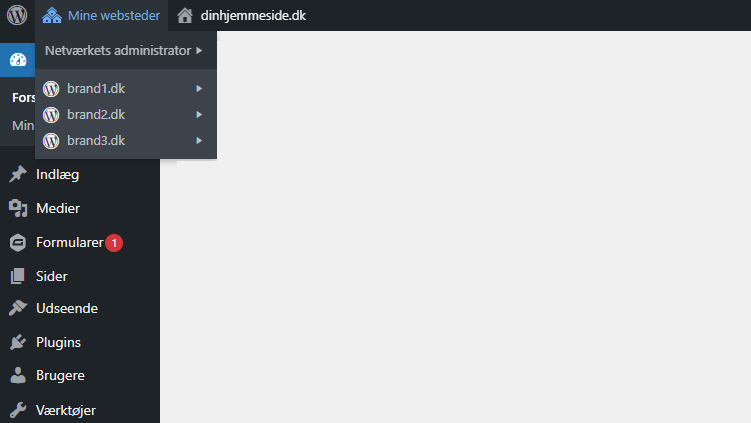
As a super admin, you can easily switch between the websites in your CMS depending on which one you need to edit, and you can also easily work with user roles, their access, and which restrictions and permissions each user should have.
You can read more about working with user roles and restrictions here.
When does Multisite make sense?
It is not for everyone.
Multisite typically makes sense if:
✅ You have multiple brands or divisions that need separate websites.
✅ You operate in multiple countries and want one website per language/market.
✅ You want to save time on maintenance and ensure a shared platform.
For a small business with one website, multisite is overkill.
How does a Multisite work technically?
In practice, it means you only have one WordPress installation, but can create and manage multiple sites on top of it. All sites share the same core files, but can have their own themes, content, and users.
For an administrator, it feels a bit like having a “site overview” where you can jump between your different sites—without having to log in and out all the time.
What do you get out of it? And what are the downsides?
| ✅ Benefits | ❌ Drawbacks |
|---|---|
| Time savings Updates and plugins are installed centrally. This saves you from repeating the work across 5 different websites. | All sites are affected If something goes wrong technically, it can impact all sites at once (because they are connected). |
| Consistency You can ensure that all brands run on the same technical foundation, and that the visual identity is maintained across them. | Some plugins do not work Not all plugins work seamlessly in Multisite. |
| Less login chaos Easy to grant and manage access for colleagues, a WordPress agency, or freelancers without having to keep track of 100 different logins. | Higher setup requirements Requires a bit more setup and experience to implement correctly. |
| Fast and cost-effective launch of a new site The above removes some of the barriers and costs of launching a new website. Suddenly, an additional website only costs DKK 10,000–15,000. This makes it easier to create campaign sites or brand sites for other parts of your portfolio. |
What is your alternative?
If Multisite is not the right fit, you can:
- Have multiple separate WordPress installations (more flexible, but more time-consuming).
- Use a multilingual plugin such as WPML or Polylang if your need is simply multiple languages and not multiple brands.
What does it look like in the backend?
When you log in, you have one dashboard with a “network admin” section where you can view and manage all sites (see the example in the image above). From here, you can:
- Add new sites
- Install plugins and themes that everyone can use
- Decide which sites have access to which features
For a regular editor, it feels completely normal—they only see “their own site” and do not need to deal with the larger network.
User roles, access, and management
One of the biggest benefits is user management.
- Central management makes it easier to grant people access—and remove it again when a colleague leaves.
- One user can be granted access to multiple sites (e.g., the marketing manager who needs to be involved across all brands).
- You can assign different roles across sites: editor on one site, but only author on another.
We have written more about restrictions and managing user roles in this post.
FAQ
Can you have different domains on one Multisite?
Can you have different designs per site?
Is it difficult to learn?
What does a Multisite cost?