Digitalization
10. November 2016
What are structured data?
Structured data are code used to help search engines better understand the content on your website. The data help search engines access key information faster and display it as rich results in SERPs (enhanced results).

What is it?
Have you ever wondered how some search results show extra information right below meta descriptions, such as ratings, images, and the number of calories in a recipe? We call that information rich snippets.
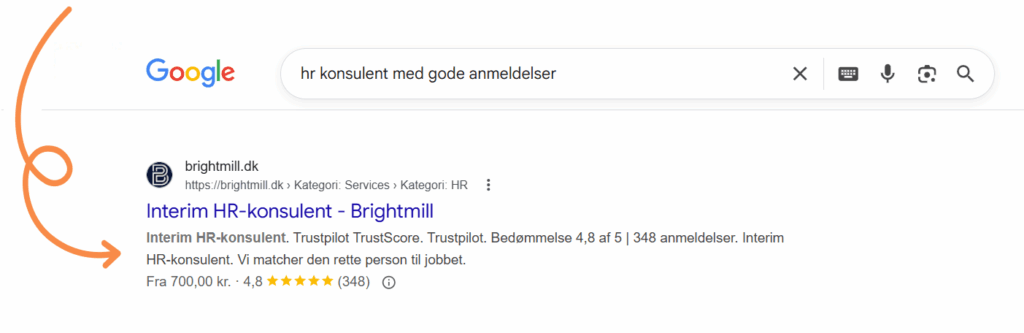
Or have you noticed the information you sometimes see on the right-hand side about, for example, a brand, an item, or a phenomenon? Such an ‘enhanced excerpt’ on the right-hand side is called the Google Knowledge Graph.
Both rich snippets and the Google Knowledge Graph are rich results (enhanced results) and come from structured data or schema.
Structured data can include product information, store information, contact information, and many other attributes relating to people, companies, places, reviews, recipes, and much more, which I elaborate on in this post – so stay with me.
For many, completing structured data therefore impacts local results and CTR (Click-Through Rate).
As previously mentioned, the purpose of structured data is to give Google a quick overview of what your website contains and is about. If you do not implement structured data, Google has no more to work with than it always has: a URL, text, HTML tags (H tags, Alt tags, meta descriptions), and a bunch of CSS.
All of these factors are still important, but to move from classic to outstanding search results packed with information and structure Google needs to upgrade its intake of information slightly for every single page it indexes.
How do you add structured data to your website?
To make it possible to add structured data to websites so that not only people, but also search engines, can read and interpret the information on your website, you need to use the right data format.
Data formats make it possible to mark up text and images on the website as machine-readable data. Using specific words or characters, the data format defines concrete rules for how to mark up structured data.
The method Google prefers, and the one we recommend, is to use JSON-LD combined with schema to create a structured data script that is added to your website header or a specific subpage.
If you look at the history behind image alt text, it was created so that blind users could also “see” the visual content on a page when the HTML is read aloud by the computer.
If you have very messy HTML, which is the only thing both the blind user and Google can read, it becomes difficult for the screen reader (and Google) to understand what the page content is.
Objectively speaking, JSON-LD has a simpler structure because everything is consolidated and the code is short and clean so, despite marginal differences, it makes sense that Google has a preference for JSON-LD over the remaining formats.
You simply find either on schema.org or through a guide for your specific type of website which information is relevant to show Google. This depends entirely on the purpose of your website.
Here is an example if it still feels a bit complicated and perhaps somewhat difficult to grasp:
If you run a physical bookshop, you should use the BookStore type in your markup when defining the type of business you operate. BookStore specifies that it is a bookshop.
To add relevant information about your bookshop, we need to specify the properties belonging to the BookStore type. There are plenty of properties to choose from for most types, so select the ones you find relevant. For the BookStore type, for example, it is relevant to specify the properties ‘name’, ‘openingHours’, and ‘telephone’.
If the above has encouraged you to set up structured data yourself, we have written a guide on how to add structured data.