Digitalization
1. December 2021
Get more out of SEO with rich results
This article covers the various enhancements, better known as “rich results”, which can help you get more traffic from search engines by increasing your visibility and click-through rate (CTR).
Content
What is it Rich results Why should you care Sponsored Google Shopping Organic rich results Featured snippets Product rich resultsWhat are rich results?
There are many more rich results than the ones I mention here, but I will focus only on the enhancements that you can influence yourself, as well as the enhancements that actually affect the amount of traffic to your website.
Rich results have only become more powerful with the rollout of Google AI overviews. Read more about how to work with AI overviews here.

What are ‘rich results’?
‘Rich results’ are enhancements to the traditional organic results in search engines, which are called a ‘snippet’.
Without rich results, your snippet consists solely of a title, a description, and a URL breadcrumb trail (breadcrumb). This composition does not help you stand out, and you also do not take up much space in the search result (Search Engine Result Page = SERP), which reduces your visibility and your CTR.
Here is an example of a traditional organic snippet:

Why should you care about rich results?
The biggest advantage of rich results is that you can achieve increased exposure. Quite simply, you take up more space in search engines and even better, you can provide the searcher with more information directly in the search engine, making people more likely to visit your website specifically.
With rich results, you can present the searcher with additional information that can capture their interest. This can be things like stars, images, extra details, company information, and much more all of which is shown in search engine results.
This information can increase your CTR, boost your visibility, and at the same time make it easier for your potential customers to contact you, buy your product, or use your content.
What are the different types of rich results?
In this article, I will cover some of the most commonly used rich results, show you what they can look like, and explain how to get them displayed.
I have divided them into two groups:
Sponsored
These are rich results that you can only get by paying for specific services, such as:
- Google Ads
- Google Shopping
Free
These are rich results that you can get by optimizing your content and implementing structured data (schema) on your website. These are the rich results that are shown as part of search engines’ organic SERPs:
- Local business
- Local map pack
- Featured snippet
- FAQ rich snippet
- Review rich snippet
- Video
- Image pack
- Breadcrumbs
- Search box
- Product
- Sitelinks
Again, keep in mind that there are many more, but I have selected the rich results that you can influence yourself and those that drive increased traffic to your website.
Sponsored rich results
Google Ads
What is it?
Paid search results that always include a title, description, and a URL. They can be expanded with sitelinks, callouts, images, ratings, phone number, address, and a contact form.
What does it look like?
They are placed right at the top of the search results, above all other types of results, and/or at the very bottom of the SERP. They are marked with a small bold “Ad” or “Annonce”.
🦈 How do I get it?
These are paid search ads, and you can create them through your Google Ads account.
Free/organic rich results
The Google My Business card
What is it?
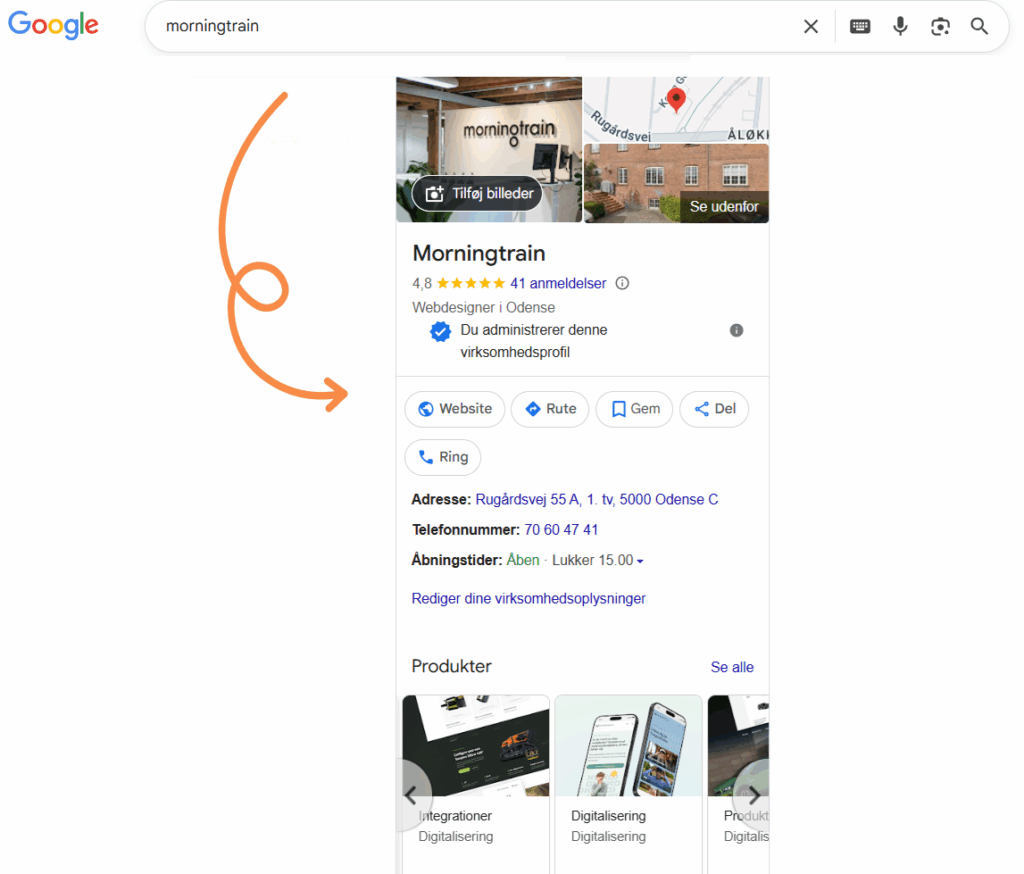
This is a rich result that is shown on the right-hand side of the traditional search results. Google My Business is most often triggered when a user performs a type of brand search—i.e., when searching for a brand name.
What does it look like?
This type of rich result is shown in a kind of “knowledge card”. It displays the company name along with a lot of other relevant information about the company (address, opening hours, reviews, images, products, or services). It can also include various calls to action (CTAs), such as a link to the website or directions to the company’s physical location.
How do I get it?
You need a verified Google My Business (GMB) profile in order to have the option of displaying your company information.
If you have already filled in your information in your GMB profile but are still not being displayed correctly, you should look into setting up a local business schema, which will help Google connect information from your website with your GMB profile.
Local Google map pack
What is it?
The local Google map pack, or the “local 3-pack”, is a rich result that is triggered when a user searches for a service in their local area.
For example: If a user is located in Odense (at the time they search) and searches for “Digital agency Odense”, they will see the 3 companies that best match the search term in the local area.
What does it look like?
This rich result resembles a Google Maps result, where 3 selected companies are displayed.
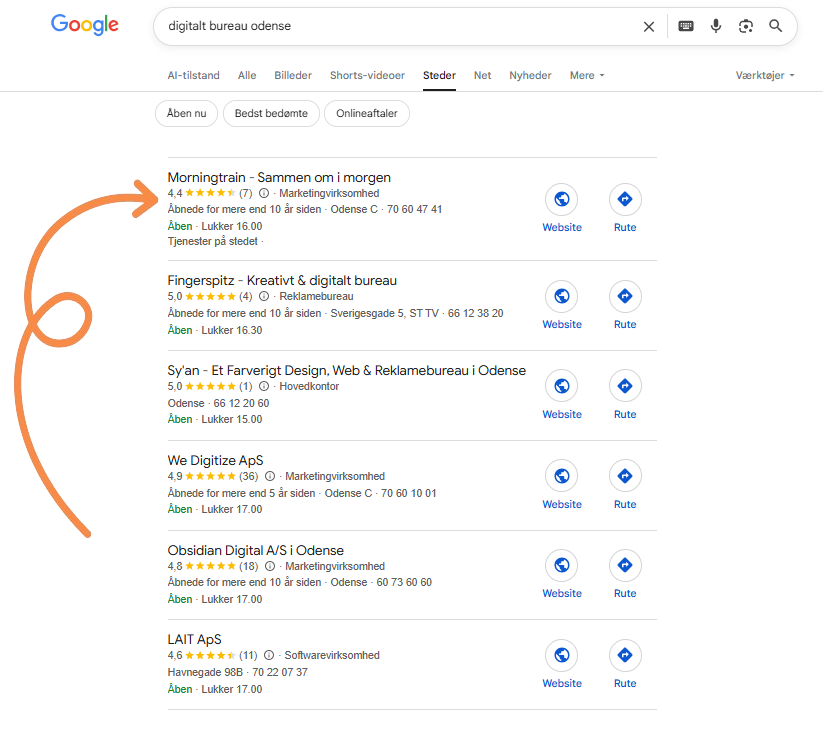
The information shown is: company name, reviews, opening hours, location, phone number, and a link to their website.
How do I get it?
A correctly set up GMB profile with local business schema and the right information is a powerful tool if you want to rank as one of the 3 results in Maps.
Featured snippet
What is it?
A ‘featured snippet’ is a short piece of text that search engines consider a relevant answer to users’ questions. A ‘featured snippet’ is shown at the very top of the SERP, above your organic snippet.
It is most often shown when a user’s search is phrased as a question and the question starts with “wh” and ends with a question mark. However, featured snippets are also shown for other searches where a user appears to be looking for information.
What does it look like?
Featured snippets are short texts that are automatically pulled from their original location in the content and displayed directly in Google. A featured snippet most often contains 40–50 words, a URL, and an image that is relevant from the article (if the article has one).
How do I get it?
You must answer the question the user is asking as precisely and in as much detail as possible. Include the question in your text, and then try to answer it in 40–50 words. The question and its answer should be the first text in your article that is intended to get a featured snippet.
Another useful trick is to use the website’s styling to your advantage. You can use the correct heading tag to mark the heading (which should be the question), and then answer the question in its own paragraph directly below the heading.
FAQ rich snippet
What is it?
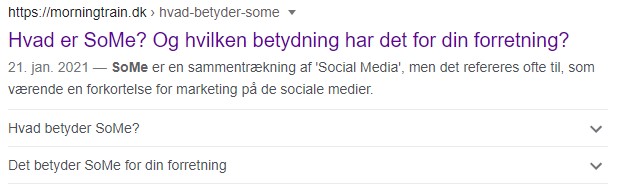
This type of rich result expands your typical organic snippets with 2–4 questions and answers, in classic FAQ style.
What does it look like?
Two questions are most often shown, as in the example below. They are displayed under your snippet in an accordion that you can expand by clicking them.
How do I get it?
The only way to get this FAQ feature displayed is to implement FAQ schema (structured data) on the landing page that should be linked to.
You need at least 2 questions in the content on your landing page. The content on the website must be identical to what you write in your schema.
However, keep in mind that it is up to Google whether it will show your FAQ feature, even if you have implemented your schema correctly.
Review rich snippet
What is it?
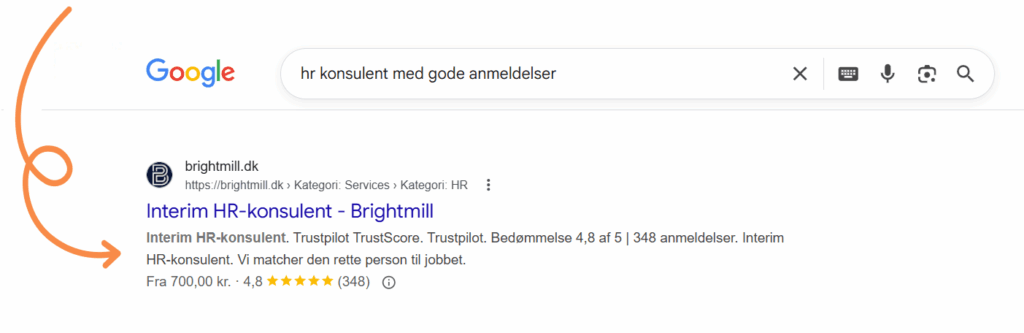
This rich result expands your snippet with a star rating in the form of stars, like on Trustpilot.
What does it look like?
The star rating is shown directly below your organic snippet, and it can either be an aggregated average rating or an individual rating from a specific reviewer. If it is an individual reviewer, the reviewer’s name will appear next to the stars.
How do I get it?
The only way to get star ratings into your snippets is to include review schema on your landing page.
You can create both the aggregated and the individual review with schema, but the individual one has a higher chance of being shown.
Even if you have implemented schema and done it correctly, it is up to Google whether they choose to show your review enhancement.
Sitelinks
What is it?
In brand searches, you can expand your snippets with additional internal links to other relevant subpages on your website.
How do I get it?
If Google does not already show sitelinks in your snippets, there are several things you can try to influence the search engine.
- Make sure your site structure and website navigation are very clear and easy to understand.
- Add a sitemap.xml file via your Google Search Console account.
- Have a unique brand name and hold the #1 position in Google for the term.
- Build more internal links to the subpages you want to be shown as sitelinks.
Sitelinks search box
What is it?
When your snippets already show sitelinks (which most often happens on brand searches), Google sometimes decides that it is relevant to add a search box to your snippet. With this rich result, the user sees a search field in your snippet that searches across your website – directly in the SERP.
What does it look like?
The search box is placed between your meta description and your sitelinks in your snippets.
How do I get it?
If Google decides it is relevant, and you already have sitelinks added to your snippet for your brand name, it may add the search function to your snippet without you needing to do anything.
However, you can influence Google by adding WebSite schema with SearchAction to your website homepage,